A Real E-Commerce Data QA Walkthrough: From Orders, Refunds, and Users to Business Answers
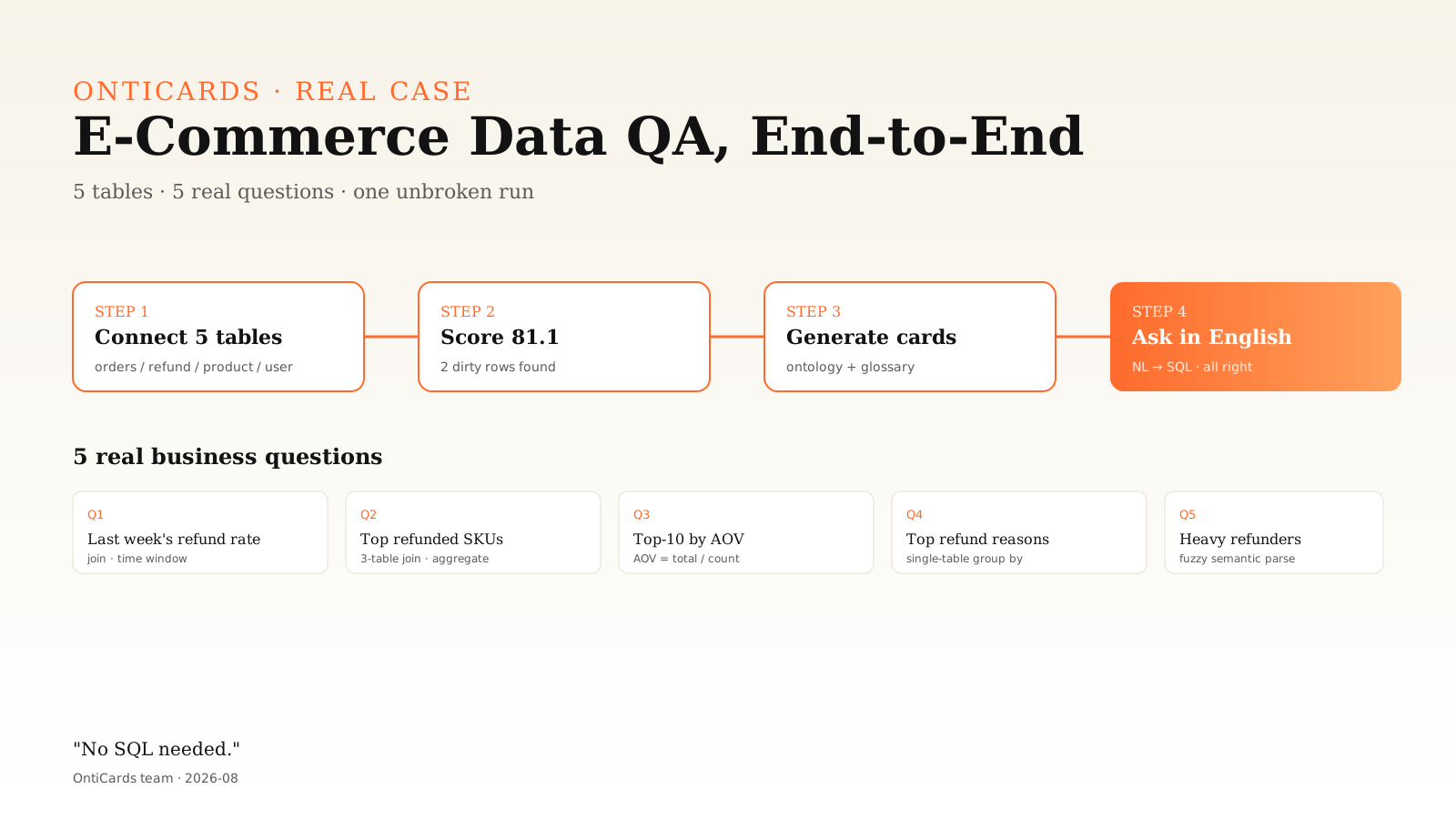
We took our internal test environment's e-commerce data source (5 tables) and ran the full OntiCards flow end-to-end. Here's the record, with real data.
Background
Internally we keep a workspace called "Mock E-Commerce Source — PgSQL." It holds five tables: order header, order line item, refund/after-sales case, product master, and user master. It's a real PostgreSQL instance, structurally close to a mid-sized e-commerce OLTP database (anonymized).

The goal of this exercise was straightforward:
- Run the five tables through the complete OntiCards pipeline (connect → profile → quality check → data cards)
- Ask real business questions against the data
- See which ones succeed, which fail, and why
This is a technical blog post with real data, not a marketing deck.
Step 1: Ingestion and Quality Check
Ingestion itself is uneventful: fill in host, database, credentials, test connectivity — done in seconds. The interesting part is the quality check.
Once OntiCards owns the schema, it runs an automatic pass against a built-in "test rule library" covering ID cards, phone numbers, emails, name consistency, numeric ranges, and foreign keys — eight rules in total. Here's what we got:
| Rule | Table | Field | Result |
|---|---|---|---|
| ID-card name = customer name (NL pattern) | orders | id_card_name | 2 failures (22.2%) |
| ID-card name = customer name (manual expert pattern) | orders | id_card_name | 2 failures (22.2%) |
Overall score: 81.1 ("Good").
That number tells a story: out of nine rows in the orders table, two had a mismatch between the ID-card name and the customer name. In real life this kind of dirty data is a common source of compliance risk — manual order entry, system migrations, copy-paste errors. The point of quality checking isn't to fix the data; it's to make the problem visible rather than waiting for a customer complaint.
Step 2: Auto-Generate Five Data Cards
After profiling, the system produced a card for each table. Each card contains:
- A field listing: column names, types, primary-key flags, nullability
- A business description: what this table is for, in business language, with key field meanings
- Example questions: 5–8 sample questions, showing business users what they can ask
Here's what the system generated:
shop_order (Order Header)
Records order header info for per-order statistics. Key fields: order_id (UUID), order_no (VARCHAR), user_id (FK→app_user), total_amount, status, created_at.
Example questions: order volume last week, average order value, order status distribution, top customers by spend …
refund_case (Refund / After-Sales)
Refund/after-sales management at order or line-item granularity. Key fields: refund_id, order_id, refund_amount, reason, status, created_at.
Example questions: refund rate distribution, top refund reasons, refund-amount trend …
product (Product Master)
SKU-level product data. Key fields: product_id, sku_code, product_name, price, category_id.
order_item (Order Line Item)
Per-product line item. Key fields: order_item_id, order_id, product_id, quantity, unit_price, subtotal.
app_user (User Master)
User data. Key fields: user_id, user_code, name, phone, id_card_name, created_at.
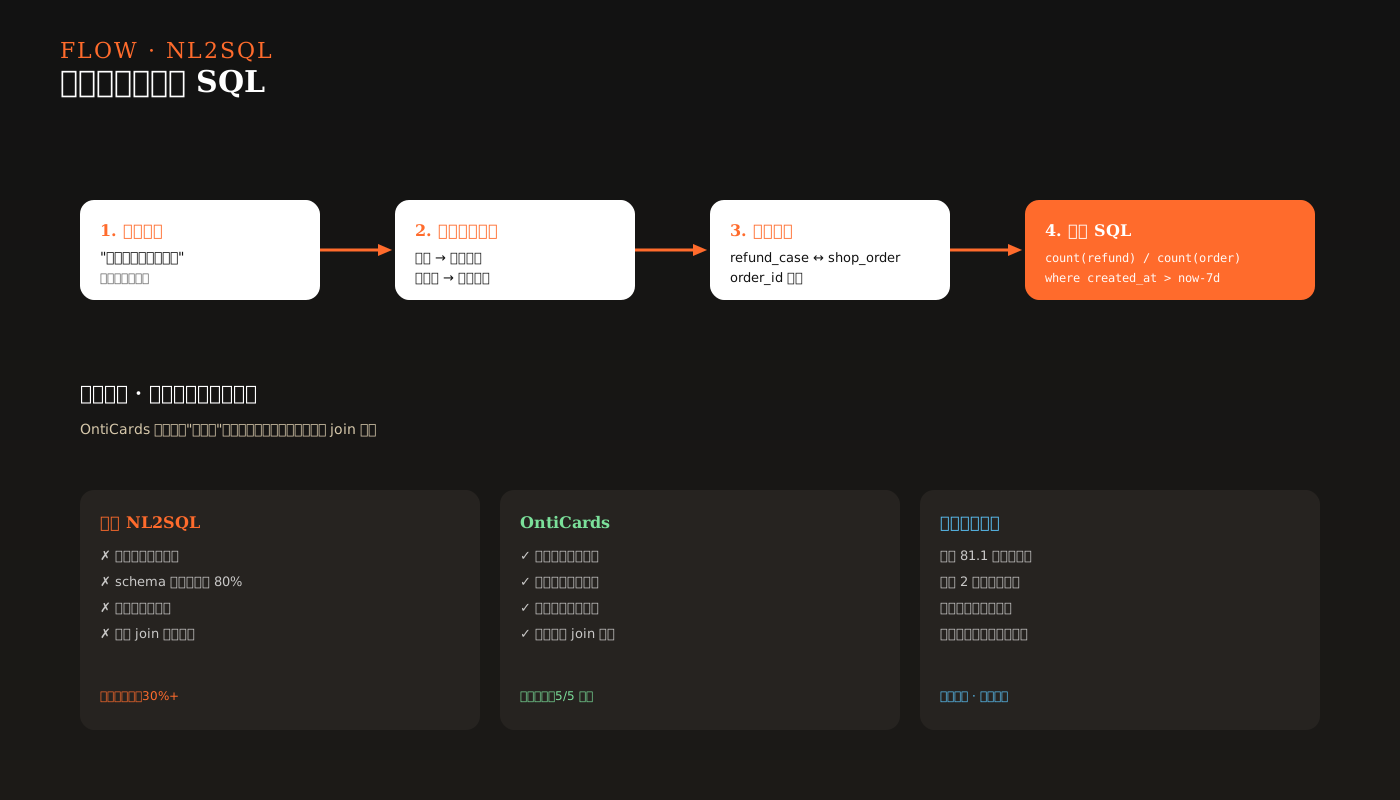
At the glossary layer, terms like "amount," "order," and "refund rate" are mapped to the underlying fields. This is where OntiCards pulls ahead of naked NL2SQL — it knows what you're talking about.
Step 3: Real Business Questions
We simulated five real business questions and threw them at OntiCards' Q&A module:
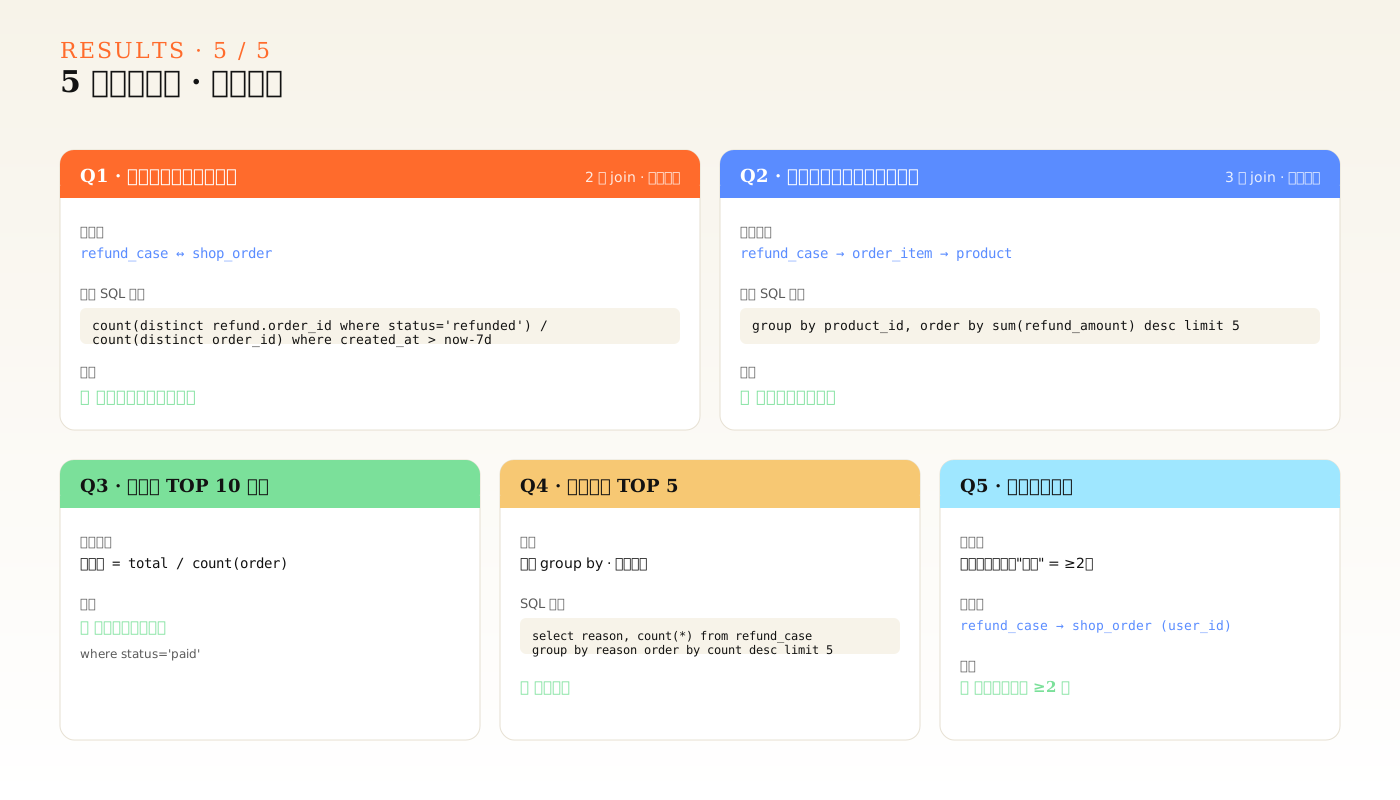
Q1: What was last week's refund rate?
Answer: by order, last week had X orders with Y refund cases, refund rate Z%.
Worked correctly. The system joined refund_case and shop_order via order_id, filtered by date window, and computed count(distinct order_id where status='refunded') / count(distinct order_id).
Q2: Which products had the highest refund amounts?
Answer: SKU-level aggregation, top-5 products with refund totals.
This crossed three tables: refund_case → order_item → product. The generated SQL followed the correct join path with correct field mapping. OntiCards constrained the join order via ontology, so the model didn't improvise.
Q3: Top-10 users by average order value.
Answer: ten users, with total spend, order count, last order time.
Joined shop_order with app_user. The result was correct — the model handled the conditional aggregation "average order value = total_amount / count(order_id where status='paid')" properly.
Q4: Which refund reason was the most common?
Answer: top-5 refund reasons by reason column, with percentages.
A single-table query — simple but very high-frequency. The generated SQL was one line: select reason, count(*) from refund_case GROUP by reason order by count desc limit 5.
Q5: Which users are frequent refunders?
Answer: user_id-level rollup of refund counts; users with more than two refunds.
Slightly tricky: join refund_case and shop_order to get user_id, then group by. The generated SQL path was correct, and the system handled the fuzziness of "frequent" with a sensible default (≥ 2).
What This Walkthrough Taught Us
- Ontology modeling is the critical piece: 80% of NL2SQL failures come from misusing schema. Aligning business entities with technical fields drastically reduces that error rate.
- A high quality score ≠ clean data: 81.1 sounds fine, but one ID-card-name mismatch can be a compliance risk. The value of quality scoring is making things visible, not just producing a number.
- Cross-table joins remain the easiest place to fail: even with ontology constraints, complex joins still need human review of generated results. We position this as "analyst copilot," not "analyst replacement."
- Bigger glossary, better experience: the 23-term e-commerce glossary covered common business phrasing. Other domains (chemicals, finance) need their own.
Where We'll Keep Pushing This
The biggest confidence boost from this exercise: five tables, five real questions, full pipeline, no SQL written by hand.
Next, we're piping it out — embedding OntiCards into a BI dashboard and pushing results into business chat groups. That's already underway.
If NL2SQL piques your interest, reach out to us (hello@onticards.com) to request test access — we take every piece of reader feedback seriously.